
The WarehousePG Platform Extension Framework (PXF) architecture consists of an extension registered inside WarehousePG (WHPG), and a Java service that runs alongside WHPG on the coordinator, standby coordinator, and every segment host. You interact with PXF through external tables, using a readable external table to query external data and a writable external table to insert into it.
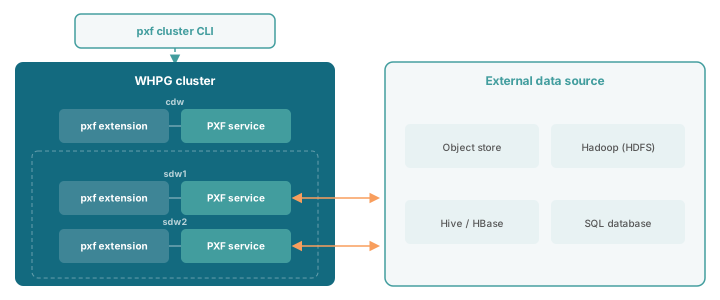
Components
The PXF architecture consists of three main components: the pxf extension inside WHPG and the PXF service, both running on every host, and the pxf cluster CLI, which you run from a shell to manage the other two.
The pxf extension
You create the pxf extension inside each database that needs external table access. It implements the pxf:// protocol, and its role differs by host when a query scans a PXF external table. On the coordinator (cdw), it only takes part in planning, working out which filters and columns to push down and estimating cost for the query plan, without contacting the PXF service or the external source. On each segment (sdw), the extension executes its share of that plan, reading the table's connector, server, and path details and forwarding the request to the local PXF service.
PXF service
The PXF service is a long-running Java (JVM) process that runs on the coordinator, standby coordinator, and every WHPG segment host. It listens on a local port (5888 by default) for requests from the pxf extension. Each PXF service instance reads its own local server configuration, which must be kept in sync across the cluster.
The pxf cluster CLI
The pxf and pxf cluster commands are a separate command-line tool for managing the PXF service across every host. Running one of its commands connects to WHPG to look up the cluster's hosts, then reaches each one over SSH to copy configuration or start and stop its local PXF service. This CLI tool doesn't take part in query execution, and it doesn't depend on the PXF service running on the host you invoke it from, so it works even if that host's PXF service is down.
Key concepts
You connect to external data through a PXF external table, which brings together a few pieces of configuration to tell PXF what to read and how to reach it.
- External table: The WHPG table you use to read or write external data through PXF. Create a readable or writable external table with a
pxf://location, the same way as any other WHPG external table. - Connector: PXF's implementation for reading from and writing to a specific kind of external data store, such as Hadoop, an S3-compatible object store, or a JDBC-accessible database. See Object stores, Hadoop, Connecting to SQL databases over JDBC, and Network file system for the connectors PXF supports.
- Server: A named configuration for a connector, telling PXF how to reach a specific external source, including details such as the endpoint URL and credentials. A table's
SERVERsetting determines which connection settings its PXF requests use. See Understanding PXF servers. - Profile: A named mapping of a connector to a data format, for example
s3:parquet. A table'sPROFILEsetting determines which connector and format code handles the request. See Understanding PXF profiles.
An external table's LOCATION clause specifies both a profile and a server:
CREATE EXTERNAL TABLE sales (id int, name text, amount numeric)
    LOCATION ('pxf://data/sales.csv?PROFILE=s3:text&SERVER=example')
    FORMAT 'CSV' (delimiter=',');
Query execution flow
A query against a PXF external table follows the same path on every segment, from the pxf extension out to the external source and back.
- A query against a PXF external table reaches the WHPG segments as part of the query's overall execution plan.
- On each segment, the
pxfextension forwards the relevant portion of the request to the local PXF service, including the profile, server name, and any parameters from theLOCATIONclause. - Each PXF service independently connects to the external source, such as an object store, Hadoop cluster, or external database, using the server configuration, and reads or writes its portion of the data.
- For reads, results stream back through the
pxfextension into the query's execution plan on that segment. For writes, the extension confirms the PXF service accepted the data before the operation completes on that segment.
Because each segment's PXF service handles its own portion of the data in parallel, a PXF query scales with the number of segments in your cluster rather than routing through a single coordinator process.
Filter pushdown
When you query a PXF external table with a WHERE clause, PXF can push part of that clause down to the external data source instead of transferring every row to WHPG and filtering there. WHPG controls pushdown through the gp_external_enable_filter_pushdown server configuration parameter. See Compatibility to check which operators and data types support it. PXF falls back to filtering in WHPG for any part of the clause the connector or profile doesn't push down.
Column projection
PXF also applies column projection automatically. With column projection, PXF asks the external data source for only the columns your query selects, rather than transferring every column and discarding the rest in WHPG. See Compatibility to check which connectors and profiles support it.