
WarehousePG Backup and Restore (whpg-backup) provides the gpbackup and gprestore utilities, which create and restore logical backups of WarehousePG tables in parallel. Because a WarehousePG cluster spreads data across many segment hosts, gpbackup and gprestore split backup and restore work across the cluster, so throughput scales with the number of segments. By default, backup files stay on local disk on the coordinator and segment hosts, though you can point them at a shared directory instead or write them directly to S3-compatible storage.
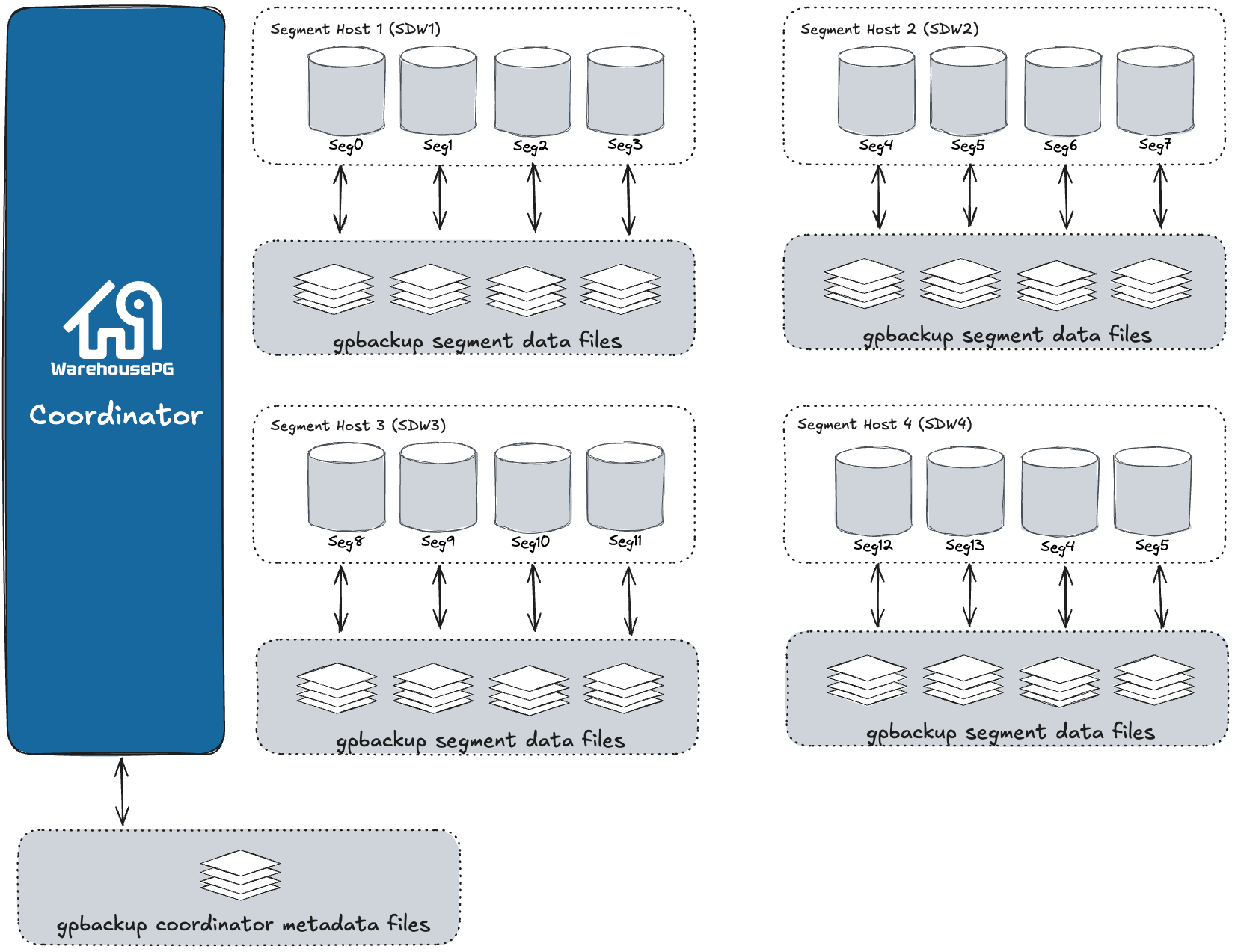
How it works
gpbackup creates a full backup of a single database, splitting the work between the coordinator and every segment host. The coordinator writes the backup's metadata and DDL, while each segment writes its own table data to CSV files, using the COPY ... ON SEGMENT command. Files are compressed by default; use --no-compression to disable it. Each gpbackup task runs in a single transaction and acquires an ACCESS SHARE lock on each table it backs up. On completion, gpbackup returns the backup's timestamp, which identifies that backup for a later restore.
The metadata files contain everything gprestore needs to reconstruct a full backup set in parallel, restoring the coordinator's schema and database objects alongside each segment's table data. Because table data is stored as CSV, other utilities, such as gpload, can also load it, in the same cluster or a different one.
gprestore restores the database objects from a backup by default. Restoring the WarehousePG cluster's global objects, such as roles and tablespaces, is optional. See Objects included in a backup for the distinction.
For the full walkthrough with example commands and output, see Running a full backup and Restoring a full backup.
Objects included in a backup
gpbackup and gprestore back up and restore two categories of objects:
Database objects for the database you specify with the
--dbnameoption. They include:- Schema and storage objects: schemas, tables, views, materialized views (DDL only), sequences, indexes, types, and domains.
- Programmability objects: functions, procedural language extensions, operators, operator families, and operator classes, casts, conversions, aggregates, and text search parsers, dictionaries, templates, and configurations.
- Rules and triggers: rules, and triggers (definitions only; WarehousePG doesn't support triggers).
- External tables: readable and writable external tables (DDL only), and protocols.
- Metadata and configuration: comments, owners, extensions, session-level configuration parameter settings, and table statistics (only with the
--with-statsoption).
Note
gpbackupandgprestorenever include these schemas in a backup set:gp_toolkit,information_schema,pg_aoseg,pg_bitmapindex,pg_catalog,pg_toast*, andpg_temp*.Global objects are also backed up by default. They include:
- Databases
- Database-wide configuration parameter settings
GRANTassignments of roles to databases- Resource group definitions
- Resource queue definitions
- Roles
- Tablespaces
Note
gprestoreonly restores global objects if you include the--with-globalsoption. Conversely,gpbackup --without-globalsskips the backup of global objects.